WebP vs JPG vs PNG vs AVIF: which format should you use?
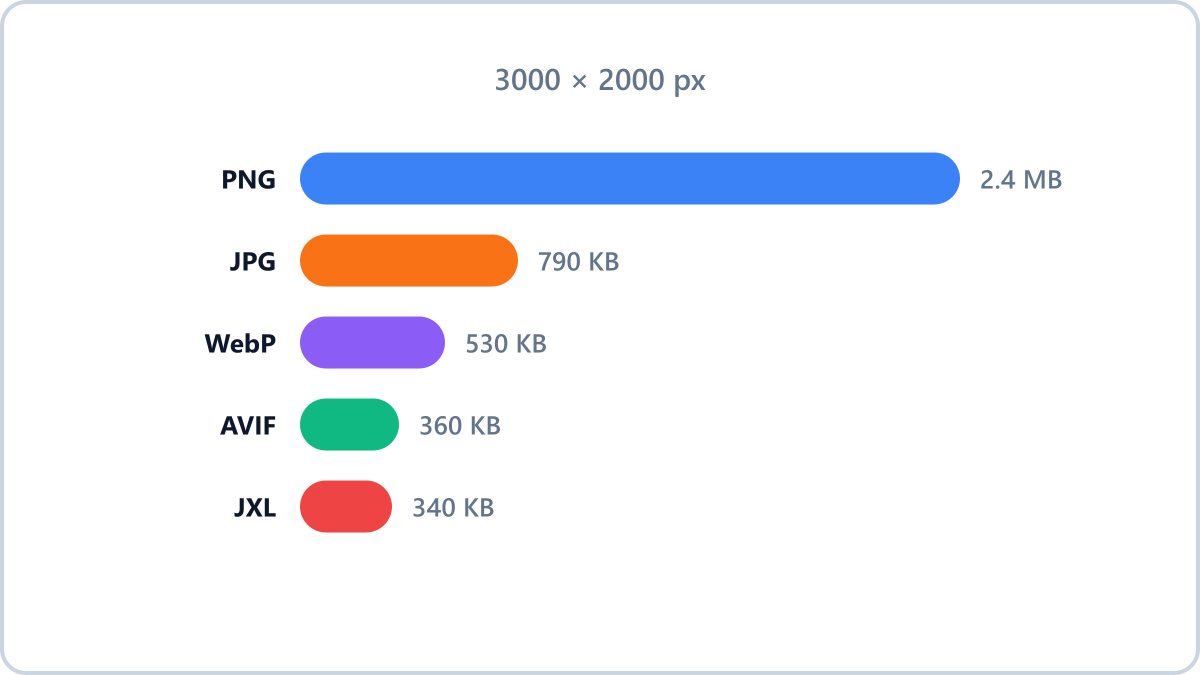
All four at a glance
- JPG — the standard since 1992. Best compatibility, ideal for photos, no transparency
- PNG — lossless with transparency. Ideal for logos and screenshots, but large
- WebP — now the de facto web standard. 30-80% smaller than JPG, supports transparency
- AVIF — the best compression of the four. Software support is still limited
For photos — JPG or WebP
Ordinary photos of people and places are best served by a lossy format. Choose JPG if the file has to open anywhere; choose WebP, which is smaller, if it is going on the web.
Convert JPG, PNG, WebP, HEIC and AVIF images into the format you need. Everything is processed in your browser, so files never leave your device.
Convert to the format you needNo install, no signup · runs in your browser, so files are never sent to a server
For logos, icons and transparency — PNG or WebP
PNG is the default for graphics that need crisp edges and a transparent background. For web use, WebP keeps the transparency at a smaller file size and is the better choice.
For website uploads — WebP by default, AVIF if you are ambitious
On the web, where page speed matters, WebP is effectively the standard. AVIF produces smaller files still, but fewer programs can open it — use it where you know the environment your images will be viewed in.
For long-term storage — PNG (or keep the original)
Images you may edit again are safest kept as lossless PNG. Saving repeatedly in a lossy format degrades quality a little each time.
Convert JPG, PNG, WebP, HEIC and AVIF images into the format you need. Everything is processed in your browser, so files never leave your device.
Convert to the format you needNo install, no signup · runs in your browser, so files are never sent to a server