AVIF explained: the next-generation image format
What is AVIF?
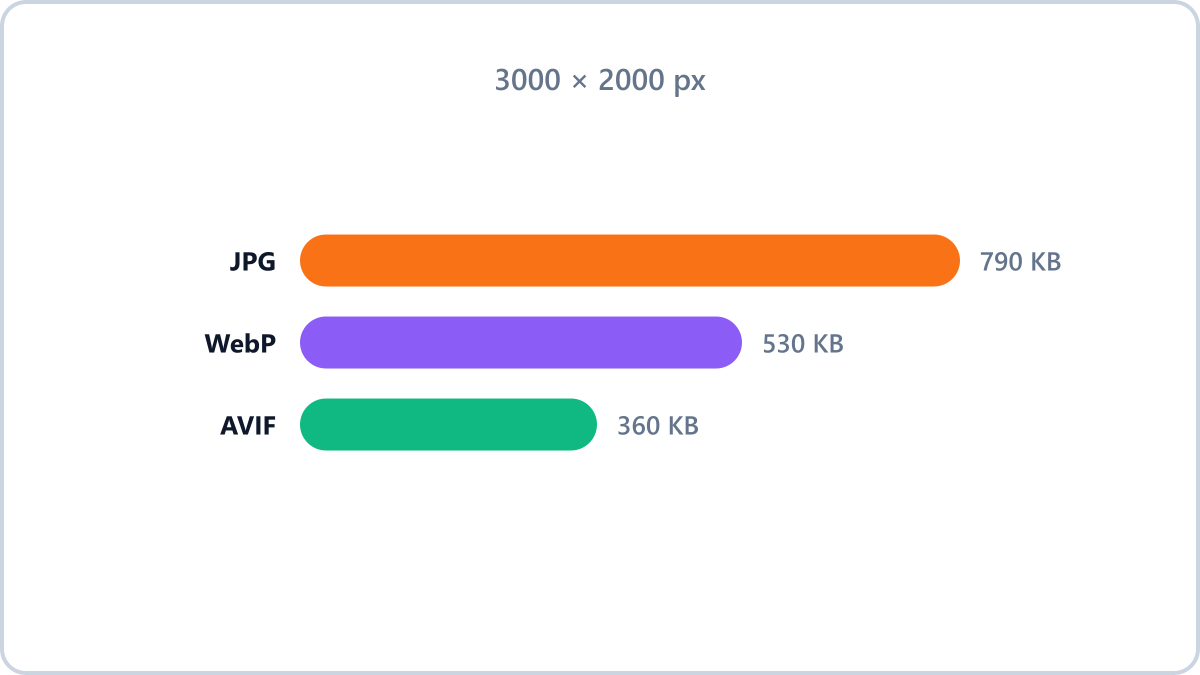
AVIF applies the compression technology of the AV1 video codec to still images. At the same quality it produces files less than half the size of JPG, and 20-30% smaller than WebP. Large services such as Netflix and YouTube have adopted it, and it is becoming steadily more common on the web.
How does it differ from WebP?
- Compression — AVIF wins, and the gap is largest on photos
- Encoding speed — AVIF is much slower (saving can take several seconds)
- Compatibility — WebP wins. AVIF needs a recent browser
- In short — AVIF if you want to push web optimization to its limit, WebP for a safe default
AVIF offers the strongest compression among modern web formats. Convert photos to AVIF, or turn AVIF files back into JPG or PNG.
Convert AVIFNo install, no signup · runs in your browser, so files are never sent to a server
If an AVIF file will not open
It is increasingly common to save an image from the web, find it is a .avif file, and then find your editor or viewer cannot open it. The format is new and support has not caught up.
Use the Image Converter NOW AVIF converter to turn it into JPG or PNG and it opens anywhere. You can also go the other way — save JPG or PNG as AVIF to squeeze a website's images as small as they will go.
When is AVIF the right choice?
AVIF pays off on a website or blog you run yourself, where you know the viewing environment. For files you hand to someone else, or whose destination you do not know, JPG and WebP are still the safer bet.
AVIF offers the strongest compression among modern web formats. Convert photos to AVIF, or turn AVIF files back into JPG or PNG.
Convert AVIFNo install, no signup · runs in your browser, so files are never sent to a server