How to watermark photos so they are harder to steal
What a watermark actually does
A watermark is not a lock. Anyone determined to remove it will remove it. What it does is make a photo annoying to reuse and leave a trace of where it came from.
That is often enough. People who lift photos start with the ones that take the least effort, and a visible mark simply sends them to a different photo.
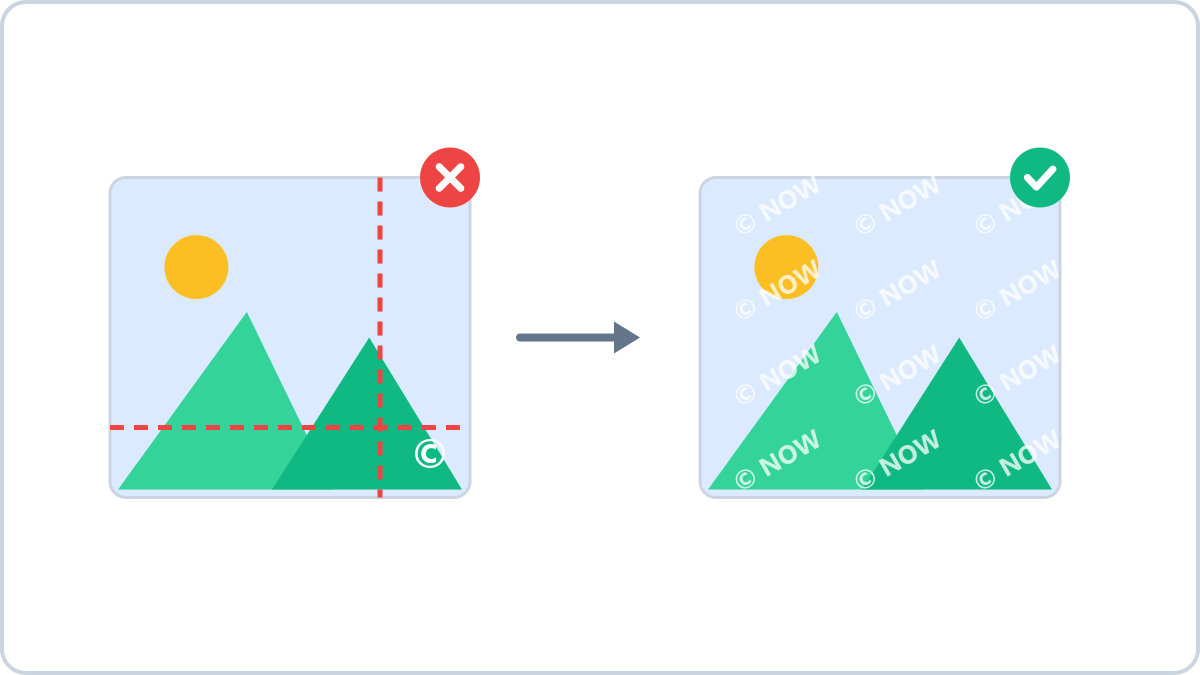
A small corner mark gets cropped away
The most common mistake is a small mark in the bottom-right corner. A quick crop removes it entirely. For photos that matter, repeating the text diagonally across the whole image is far harder to defeat.
The trade-off is that a repeated mark makes the photo harder to look at. For product shots, keep it off the centre and drop the opacity to 30–50%; for drafts and documents, where leaking is the real risk, go dark and dense.
Put your name, shop name or copyright line on your photos. Apply the same settings to several images at once and get them back as a ZIP.
Start adding a watermarkNo install, no signup · runs in your browser, so files are never sent to a server
With several photos, do them in one pass
A listing with ten photos means watermarking ten times. The watermark tool on Image Converter NOW takes up to 10 images, applies the same text, position and size to all of them, and hands back a single ZIP.
Everything runs inside your browser, so nothing is uploaded. That matters here: photos being watermarked are usually ones you have not published yet.
When this comes in handy
- Marketplace listings — an ID on product shots to tell yours from copies
- Publishing work — a name and copyright line on portfolio images
- Sending drafts — “SAMPLE” repeated across proofs before payment
- Document copies — “COPY” or “CONFIDENTIAL” laid diagonally to discourage leaks
Put your name, shop name or copyright line on your photos. Apply the same settings to several images at once and get them back as a ZIP.
Start adding a watermarkNo install, no signup · runs in your browser, so files are never sent to a server