How to make an ID photo at home
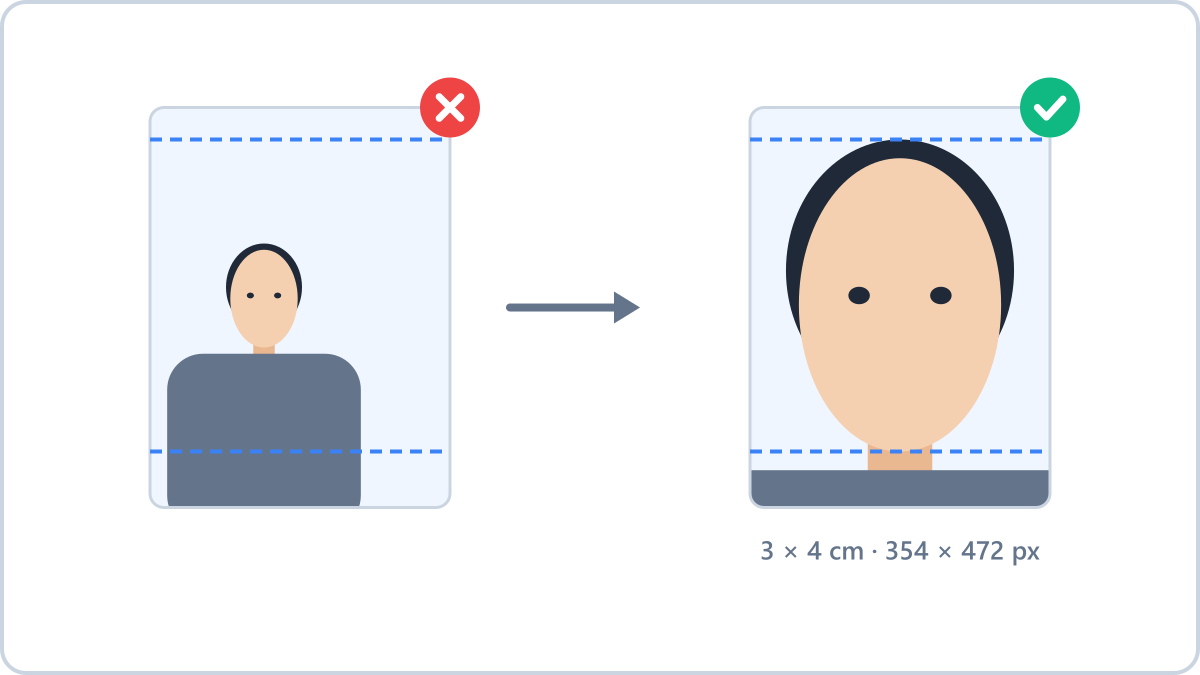
Start with the size — 3×4 and 3.5×4.5 are different
The ID photo used for résumés and student cards is 3×4cm, while passports and driving licences use 3.5×4.5cm. They look similar, but the proportions differ — a 3×4 photo submitted for a passport puts the face at the wrong scale.
At 300dpi, 3×4cm is 354×472 pixels and 3.5×4.5cm is 413×531 pixels. For screen use the pixel count is enough, but if you plan to print, you need that resolution for the physical size to come out right.
Three things to get right when shooting at home
Plain white wall, straight on, no shadows. That covers most requirements. Facing a window gives even light on the face, and standing a step away from the wall removes the shadow behind you.
Prop the phone up and use the timer instead of holding it at arm's length. An outstretched arm puts the face close to the lens, which exaggerates the nose.
Fit a photo you took at home to the required size, clean up the background and get a 4×6 print sheet — all in your browser, so the face photo never leaves your device.
Make an ID photoNo install, no signup · runs in your browser, so files are never sent to a server
Fitting the frame and printing
Load the photo into the ID photo tool on Image Converter NOW and you get the size frame with guide lines. Drag the photo until the face sits between the head-room line and the chin line. If the background is messy, “Make background white” cleans it up.
For printing, take the 4×6 inch sheet. It carries several copies (9 for 3×4cm, 6 for 3.5×4.5cm), so a single 4×6 print gives you a whole set at a shop or a kiosk. Cut along the lines and you are done.
Why photos get rejected
- Smiling or an open mouth — passports and visas require a neutral expression
- Glare on the glasses, or thick frames covering the eyes
- Hair covering the outline of the face, especially eyebrows and jawline
- Shadows on the background, or patterns and objects caught in the frame
Fit a photo you took at home to the required size, clean up the background and get a 4×6 print sheet — all in your browser, so the face photo never leaves your device.
Make an ID photoNo install, no signup · runs in your browser, so files are never sent to a server